> ## Documentation Index
> Fetch the complete documentation index at: https://docs.qwacks.com/llms.txt
> Use this file to discover all available pages before exploring further.
# What a playtest collects
> Video, performance windows, exceptions and feedback forms from an Unreal playtest build.
Each of these runs only while the playtest turns it on in Protokite **and the player has allowed it**,
and each has Blueprint nodes that are safe in every build: with no playtest running they answer false,
empty or Turned Off and change nothing. Setting the build up is on the
[Unreal plugin](/protokite/unreal-plugin) page.
## What the player allowed
The build asks its player what this playtest may collect before it collects anything, and their answer
decides what the rest of this page does:
| Their answer | Video recording | Heavy analytics and exceptions |
| -------------------------------------- | --------------- | ------------------------------------- |
| Record my screen and collect play data | Runs | Runs |
| Record my screen only | Runs | Off |
| Collect play data only | Off | Runs |
| Collect nothing | Off | Off, and no session is started at all |
**Flock Is Playtest Feature Enabled** already answers for both at once: a feature the playtest turns on
and the player left out reads as off, everywhere. **Flock Get Playtest Consent** gives the answer
itself, and the question, how a game asks it in its own screens, and the setting that turns it off are
on the [Unreal plugin](/protokite/unreal-plugin#what-the-player-is-asked) page.
**The feedback form is not covered by that answer.** It is sent only when a player fills it in and
presses Send, which is their own doing either way — and a form an earlier launch could not send is
still sent later, whatever they answered since.
## Video recording
The game's screen is recorded from the moment the playtest loads, one recording per launch, into a
WebM file a browser plays. Background time is not recorded. The **Video Recording** settings in **Flock
Playtest Settings** set the size, frame rate and bitrate — 1280×720, 30 frames a second and
**Video Bitrate (kbps)** 2000 by default — and two limits, whichever comes first: **Recording Length
Limit (Minutes)**, 60, and **Recording Size Limit (MB)**, 1536.
A recording is uploaded to its session:
* when a length or size limit ends it;
* when the game asks, with **Flock Stop And Upload Playtest Recording** or the feedback form's
**Upload your recording** button;
* when the game stops it for good, with **Flock Stop Video Recording**;
* and at the start of a later launch, for anything an earlier launch could not send: a failed upload, a
quit, a crash.
**Quitting does not upload.** A whole recording cannot be sent inside a shutdown, so it is kept and
the next launch sends it. A recording is deleted once uploaded, and one that no playtest session ever
started for is deleted by the next launch, since it can never be sent.
Recordings wait under `Saved/FlockPlaytest/Recordings/`, inside **Recordings Disk Budget (MB)**, 4096.
When room is short the oldest test videos go first and recordings waiting to be uploaded go last.
Offer a player a way to send their recording only while **Flock Can Send Playtest Recording** is true.
It is false when no session has started for the recording, and a button pressed then would stop the
recording and send nothing. To tell the player how it went, bind **On Recording Upload Finished**: it
is raised once when the launch's recording finishes — uploaded, or not uploaded with the reason,
including when the upload could not begin at all. It is not raised while the game is closing.
## Heavy analytics
The plugin sends these through the Flock SDK's analytics, under the `playtest` category, and they read
on **Dashboards → Game Metrics**:
* `performance_window` for every ten seconds of play: median, 95th and 99th percentile frame time,
hitches, and memory used and at its peak;
* `level_loaded` for every level this game instance loads, with the level before it and, for a blocking
load, how long it took;
* your own events, with **Flock Record Playtest Event**. Build their properties with the Set Command
nodes.
Nothing is sent while the Flock SDK's **Analytics Enabled** is off; the log says so once. See
[Analytics & events](/guides/analytics-and-events) for how the category and the dashboards fit together.
## Exceptions
Exceptions stay the Flock SDK's. It captures error lines, failed ensures, Blueprint script errors such
as Accessed None, and crashes, with its own settings under **Analytics | Exceptions**, and reports them
on **Diagnostics → Errors**. A playtest's exception switch never turns that on or off; when a playtest
asks for exceptions and **Analytics Capture Exceptions** is off, the log warns once as the session
starts.
To check that exceptions reach the dashboard, type `Flock.RaiseTestException error` or
`Flock.RaiseTestException blueprint 100` in the console of a Development build. A hundred of the same
fault arrive as one report, then one repeat report counting the other ninety-nine once the repeat
window closes.
## The feedback form
When the playtest publishes a form, players open it with **Feedback Form Key** (F9 by default; set it
to none to turn the key off), or your game opens it with **Flock Open Feedback Form** — from a pause
menu, for example. Check **Flock Can Open Feedback Form** first: it is false when the playtest
published no form, so your game can leave its own entry out rather than offering nothing.
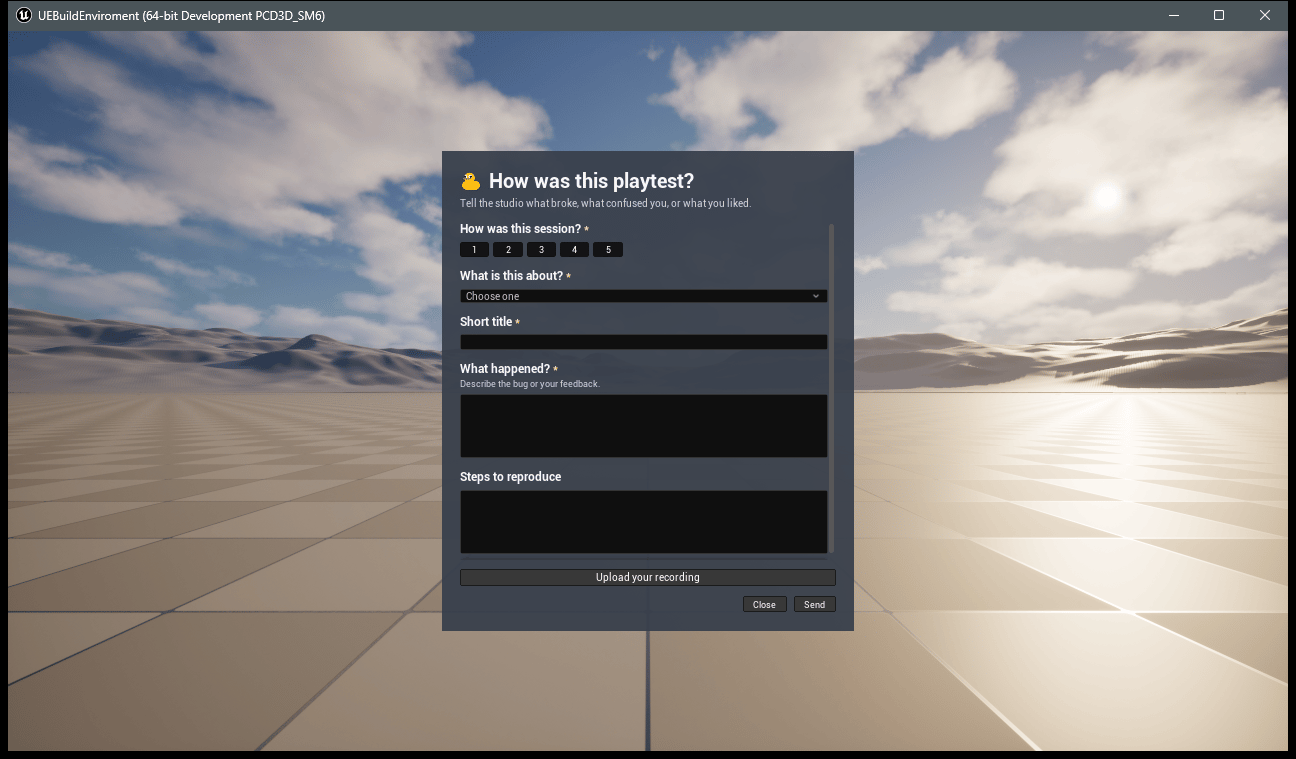 While the form is open the mouse shows and typing goes to it; closing or sending it puts both back as
they were. **Pause The Game While The Form Is Open** is off by default, because pausing does nothing in
a multiplayer game and loses what a single player was about to describe.
Every question comes from the playtest, so editing the form in Protokite changes what players see with
no new build. Answers are checked before they are sent, with every problem shown against its question.
A form that cannot be sent is kept and sent by a later launch, and sending again in the same session
replaces the earlier answers.
### A form of your own
**Flock Get Feedback Form** hands your UI the questions: each one's id, kind, label, help text, options
and whether it needs an answer. Record answers with **Set Feedback Text Answer**, **Set Feedback Rating
Answer** (1 to 5), **Set Feedback Checkbox Answer** and **Set Feedback Chosen Option**, check them with
**Find Feedback Form Problems**, and send them with **Flock Send Feedback Form Answers**.
Compare a question's kind with the **Flock Feedback Question Kind** nodes rather than typing it, and
treat a kind you do not know as text, which is how the server reads it.
Two rules are easy to miss. **Set every checkbox**, ticked or not: the server counts an unticked box
as an answer, and a needed checkbox that was never set is missing. And **a chosen option must match
letter for letter** — the server compares options exactly, so `crash` is not `Crash`.
## Blueprint nodes
All under **Flock | Playtest**. Each finds the playtest from the calling graph.
| Node | Answers or does |
| ---------------------------------------------------------------------------------------------------------------------- | ---------------------------------------------------- |
| Flock Get Playtest Status, Flock Is Playtest Ready, Flock Describe Playtest Status | Whether playtest work may run, and why not |
| Flock Is Playtest Feature Enabled, with Flock Playtest Feature Video Recording / Exception Capturing / Heavy Analytics | Whether the playtest turns a feature on |
| Flock Get Playtest Consent, Flock Get Players Consent Answer, Flock Describe Playtest Consent | What the player let this playtest collect |
| Flock Set Playtest Consent, Flock Ask For Playtest Consent, Flock Is Consent Question Open | Answering it from your own screens, and asking again |
| Flock Get Playtest Session Id, Flock End Playtest Session | The launch's Protokite session |
| Flock Record Playtest Event | Records one of your own playtest events |
| Flock Is Recording Video, Flock Stop Video Recording | The launch's recording |
| Flock Can Send Playtest Recording, Flock Stop And Upload Playtest Recording | Sending the recording now |
| Flock Can Open Feedback Form, Flock Open / Close Feedback Form, Flock Is Feedback Form Open | The built-in form |
| Flock Get Feedback Form, Set Feedback … Answer, Find Feedback Form Problems, Flock Send Feedback Form Answers | A form of your own |
## Trying it in the editor
**Before any playtest exists**, tick **Record Video In Play In Editor** in **Project Settings → Plugins
→ Flock Playtest Local Settings** and press Play, or type `FlockPlaytest.RecordTestVideo 30` in a
Development build's console. Test videos are saved under
`Saved/FlockPlaytest/Recordings/TestVideos/` and never uploaded.
**Against a real playtest**, press Play with the settings from the setup page and sign in with
`Flock.LoginWithDevice`. Then, in a Development build's console:
| Console command | Does |
| ------------------------------------------------------------ | -------------------------------------------------------------------------------------------------------------------------------------------- |
| `FlockPlaytest.AnswerConsent ` | Answers what the playtest may collect: `video_and_play_data`, `video_only`, `play_data_only`, `nothing`, or `not_answered` to be asked again |
| `FlockPlaytest.OpenFeedbackForm [seconds]` | Opens the form, after a wait if given |
| `FlockPlaytest.SendTestFeedback [seconds]` | Fills in the published form and sends it, to check answers reach Protokite |
| `FlockPlaytest.StopVideoRecordingAndUploadIt [seconds]` | Stops the recording and uploads it |
| `FlockPlaytest.StopVideoRecording` | Stops the recording; like any finished one, it is uploaded when it has a session |
| `Flock.RaiseTestException [error\|blueprint] [times]` | Raises a fault the Flock SDK reports |
| `FlockPlaytest.SelfTest [closed playtest's Game Version ID]` | Checks the whole playtest against Protokite |
The waits exist because every `-ExecCmds` command runs on the first frame, before anything has been
recorded or a session has started.
## Checking a playtest build
`FlockPlaytest.SelfTest` checks everything a playtest build does against your real Protokite in one go,
and logs a line per step and a count at the end: `Playtest self-test finished: 16 passed, 0 failed, 1
skipped.` Development builds only.
Each check sits beside a request Protokite must refuse: a wrong API key, a missing one, a version no
playtest is linked to, a session start that names no player, a form missing a needed answer or choosing
an option that is not on the list, and a form, upload link and end for a session that does not exist. A
check that only ever succeeds cannot tell a working build from a broken one, so a refusal passes only
with its own HTTP status and, for a form, the question it names.
It signs nobody in, so sign in first. From a script:
```
UnrealEditor-Cmd.exe MyGame.uproject -game -windowed -ExecCmds="Flock.LoginWithDevice, FlockPlaytest.SelfTest, Flock.QuitAfterSeconds 90" -log
```
* **It ends the launch's session as its last step**, so run it in a launch of its own. A session a
refusal should have prevented is ended at once, so a run leaves nothing open.
* **It leaves a trace on your dashboards:** one filled-in form on its session, one `playtest_self_test`
event, one Blueprint fault raised twice so its repeat is counted, and the launch's recording.
* **A step is skipped, saying why,** when nobody has answered what the playtest may collect (answer it
first with `FlockPlaytest.AnswerConsent video_and_play_data`); when the playtest does not turn its feature on; when the build has
no video encoder, which is every platform but 64-bit Windows; when the launch cannot draw
(`-nullrhi`), since nothing is recorded; when **Analytics Cache Failed Events** is off, since a report
sent the moment it is made cannot be watched; and for a closed playtest unless you name one.
## What stays on the player's machine
| Folder under `Saved/FlockPlaytest/` | Holds | Until |
| ----------------------------------- | -------------------------------------------------------- | ------------------------------------------------- |
| `Recordings/Playtest/` | Playtest recordings, each with the session it belongs to | Uploaded, or deleted for disk room, oldest last |
| `Recordings/TestVideos/` | Test videos | Deleted for disk room, oldest first |
| `FeedbackForms/` | Answers that could not be sent | Sent, or refused by the server |
| `device_id.txt` | This install's device ID, when no Steam ID is available | Kept, so one install stays one player |
| `playtest_consent.json` | What the player let this playtest collect | Kept, so they are asked once and not every launch |
While the form is open the mouse shows and typing goes to it; closing or sending it puts both back as
they were. **Pause The Game While The Form Is Open** is off by default, because pausing does nothing in
a multiplayer game and loses what a single player was about to describe.
Every question comes from the playtest, so editing the form in Protokite changes what players see with
no new build. Answers are checked before they are sent, with every problem shown against its question.
A form that cannot be sent is kept and sent by a later launch, and sending again in the same session
replaces the earlier answers.
### A form of your own
**Flock Get Feedback Form** hands your UI the questions: each one's id, kind, label, help text, options
and whether it needs an answer. Record answers with **Set Feedback Text Answer**, **Set Feedback Rating
Answer** (1 to 5), **Set Feedback Checkbox Answer** and **Set Feedback Chosen Option**, check them with
**Find Feedback Form Problems**, and send them with **Flock Send Feedback Form Answers**.
Compare a question's kind with the **Flock Feedback Question Kind** nodes rather than typing it, and
treat a kind you do not know as text, which is how the server reads it.
Two rules are easy to miss. **Set every checkbox**, ticked or not: the server counts an unticked box
as an answer, and a needed checkbox that was never set is missing. And **a chosen option must match
letter for letter** — the server compares options exactly, so `crash` is not `Crash`.
## Blueprint nodes
All under **Flock | Playtest**. Each finds the playtest from the calling graph.
| Node | Answers or does |
| ---------------------------------------------------------------------------------------------------------------------- | ---------------------------------------------------- |
| Flock Get Playtest Status, Flock Is Playtest Ready, Flock Describe Playtest Status | Whether playtest work may run, and why not |
| Flock Is Playtest Feature Enabled, with Flock Playtest Feature Video Recording / Exception Capturing / Heavy Analytics | Whether the playtest turns a feature on |
| Flock Get Playtest Consent, Flock Get Players Consent Answer, Flock Describe Playtest Consent | What the player let this playtest collect |
| Flock Set Playtest Consent, Flock Ask For Playtest Consent, Flock Is Consent Question Open | Answering it from your own screens, and asking again |
| Flock Get Playtest Session Id, Flock End Playtest Session | The launch's Protokite session |
| Flock Record Playtest Event | Records one of your own playtest events |
| Flock Is Recording Video, Flock Stop Video Recording | The launch's recording |
| Flock Can Send Playtest Recording, Flock Stop And Upload Playtest Recording | Sending the recording now |
| Flock Can Open Feedback Form, Flock Open / Close Feedback Form, Flock Is Feedback Form Open | The built-in form |
| Flock Get Feedback Form, Set Feedback … Answer, Find Feedback Form Problems, Flock Send Feedback Form Answers | A form of your own |
## Trying it in the editor
**Before any playtest exists**, tick **Record Video In Play In Editor** in **Project Settings → Plugins
→ Flock Playtest Local Settings** and press Play, or type `FlockPlaytest.RecordTestVideo 30` in a
Development build's console. Test videos are saved under
`Saved/FlockPlaytest/Recordings/TestVideos/` and never uploaded.
**Against a real playtest**, press Play with the settings from the setup page and sign in with
`Flock.LoginWithDevice`. Then, in a Development build's console:
| Console command | Does |
| ------------------------------------------------------------ | -------------------------------------------------------------------------------------------------------------------------------------------- |
| `FlockPlaytest.AnswerConsent ` | Answers what the playtest may collect: `video_and_play_data`, `video_only`, `play_data_only`, `nothing`, or `not_answered` to be asked again |
| `FlockPlaytest.OpenFeedbackForm [seconds]` | Opens the form, after a wait if given |
| `FlockPlaytest.SendTestFeedback [seconds]` | Fills in the published form and sends it, to check answers reach Protokite |
| `FlockPlaytest.StopVideoRecordingAndUploadIt [seconds]` | Stops the recording and uploads it |
| `FlockPlaytest.StopVideoRecording` | Stops the recording; like any finished one, it is uploaded when it has a session |
| `Flock.RaiseTestException [error\|blueprint] [times]` | Raises a fault the Flock SDK reports |
| `FlockPlaytest.SelfTest [closed playtest's Game Version ID]` | Checks the whole playtest against Protokite |
The waits exist because every `-ExecCmds` command runs on the first frame, before anything has been
recorded or a session has started.
## Checking a playtest build
`FlockPlaytest.SelfTest` checks everything a playtest build does against your real Protokite in one go,
and logs a line per step and a count at the end: `Playtest self-test finished: 16 passed, 0 failed, 1
skipped.` Development builds only.
Each check sits beside a request Protokite must refuse: a wrong API key, a missing one, a version no
playtest is linked to, a session start that names no player, a form missing a needed answer or choosing
an option that is not on the list, and a form, upload link and end for a session that does not exist. A
check that only ever succeeds cannot tell a working build from a broken one, so a refusal passes only
with its own HTTP status and, for a form, the question it names.
It signs nobody in, so sign in first. From a script:
```
UnrealEditor-Cmd.exe MyGame.uproject -game -windowed -ExecCmds="Flock.LoginWithDevice, FlockPlaytest.SelfTest, Flock.QuitAfterSeconds 90" -log
```
* **It ends the launch's session as its last step**, so run it in a launch of its own. A session a
refusal should have prevented is ended at once, so a run leaves nothing open.
* **It leaves a trace on your dashboards:** one filled-in form on its session, one `playtest_self_test`
event, one Blueprint fault raised twice so its repeat is counted, and the launch's recording.
* **A step is skipped, saying why,** when nobody has answered what the playtest may collect (answer it
first with `FlockPlaytest.AnswerConsent video_and_play_data`); when the playtest does not turn its feature on; when the build has
no video encoder, which is every platform but 64-bit Windows; when the launch cannot draw
(`-nullrhi`), since nothing is recorded; when **Analytics Cache Failed Events** is off, since a report
sent the moment it is made cannot be watched; and for a closed playtest unless you name one.
## What stays on the player's machine
| Folder under `Saved/FlockPlaytest/` | Holds | Until |
| ----------------------------------- | -------------------------------------------------------- | ------------------------------------------------- |
| `Recordings/Playtest/` | Playtest recordings, each with the session it belongs to | Uploaded, or deleted for disk room, oldest last |
| `Recordings/TestVideos/` | Test videos | Deleted for disk room, oldest first |
| `FeedbackForms/` | Answers that could not be sent | Sent, or refused by the server |
| `device_id.txt` | This install's device ID, when no Steam ID is available | Kept, so one install stays one player |
| `playtest_consent.json` | What the player let this playtest collect | Kept, so they are asked once and not every launch |