> ## Documentation Index
> Fetch the complete documentation index at: https://docs.qwacks.com/llms.txt
> Use this file to discover all available pages before exploring further.
# Unreal plugin
> Turn a Development build of your Unreal game into a playtest build for Protokite.
Flock Playtest is an optional Unreal plugin that turns a Development build into a **playtest build**.
While a playtest runs, every launch of the game becomes one session on the playtest's **Sessions**
page, and the playtest decides what that session collects.
`FlockPlaytest-.zip` ships beside the Flock SDK's own zip, in the same release and at the
same version.
**Unreal only for now.** The playtest plugin ships for Unreal Engine; it runs on top of the Flock
Unreal SDK and sends that SDK's API key.
## What a playtest collects
| Playtest feature | What the build sends | Where it shows |
| ------------------------- | --------------------------------------------------------------------------------------------- | ------------------------------------------------------------------ |
| Always | One session per launch, named after the player's Steam ID or this install's device ID | Protokite **Sessions** |
| Video recording | A recording of the game's screen, uploaded when it ends | The session's recording player |
| Heavy analytics | A performance window every ten seconds of play, each level load, and your own playtest events | Flock **Dashboards → Game Metrics**, under the `playtest` category |
| Exception capturing | Nothing extra — the Flock SDK already reports exceptions, and the playtest only asks for them | Flock **Diagnostics → Errors** |
| A published feedback form | The player's answers | The session card, and the playtest's **Feedback form** page |
Every one of them is switched on the playtest's page in Protokite, so changing what a playtest
collects needs no new build — and the player is asked first, so a launch collects only what they
allowed. See [What the player is asked](#what-the-player-is-asked).
## Before you start
* **The Flock SDK is set up and working** in the project — API URL, API Key, Game Name and Game
Version, with the Flock panel showing nothing to fix. See the [Unreal SDK](/sdk/unreal) page.
* **A playtest exists in Protokite.** Creating one makes a Flock game version for it, named `pt-`
followed by the test's ID.
* **Playtest builds are Development builds.** A Shipping build compiles logging out, so the Flock SDK
cannot report error lines or failed ensures from it.
* **Video is recorded on 64-bit Windows only.** Every other platform runs the rest of the playtest and
logs once that it records no video.
## Install the plugin
Put it in your project's `Plugins/` folder, so `Plugins/FlockPlaytest/` sits beside
`Plugins/FlockUnrealSdk/`.
Turn on **Flock Playtest** under **Edit → Plugins → Online Platform**, and restart the editor so
it builds.
Cloned the SDK repository instead? Copy or link `Plugins/FlockUnrealSdk/OptionalPlugins/FlockPlaytest/`
to `Plugins/FlockPlaytest/` — Unreal does not load a plugin from where that folder sits. Leave the
plugin out of projects that are not running playtests.
## Point the build at the playtest
Protokite finds the playtest from the Flock game version the build sends.
Open the test in Protokite. Its **SDK** block shows the playtest's Flock version **ID**.
In **Project Settings → Plugins → Flock SDK Settings**, set **Game Version** to `pt-` followed by
the test's ID, for example `pt-01JABCDEFGHJKMNPQRSTVWXYZ0`. The Flock SDK resolves that name to the ID
Protokite showed you.
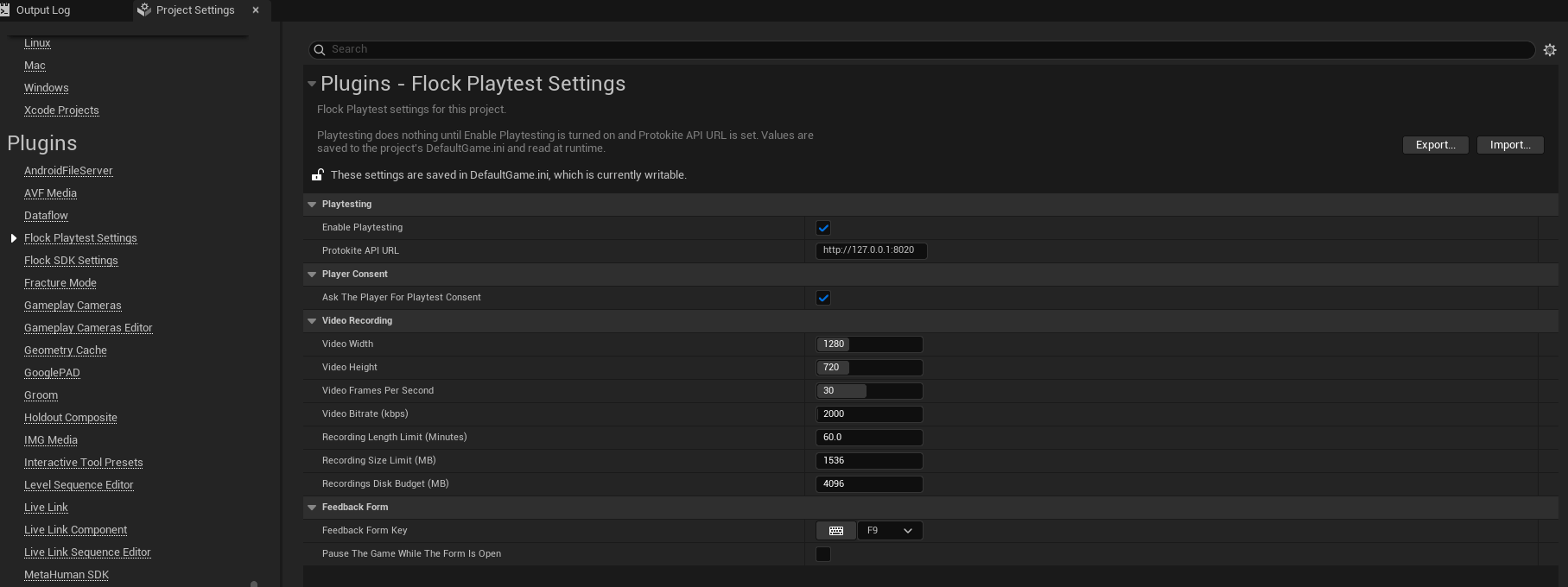
In **Project Settings → Plugins → Flock Playtest Settings**, set **Protokite API URL** and turn on
**Enable Playtesting**. The URL must start with `http://` or `https://` and contain no spaces; one that does
not is refused rather than tidied up.
 Set the version's **name**, not the ID Protokite displays. The Flock SDK resolves Game Version again
whenever Game Version, API URL or API Key changes, and replaces an ID written in by hand.
Pressing **Play** now lists in the Play message log whatever would stop the playtest or change it, each
with a link to the page that fixes it: an empty or unusable Protokite API URL, the Flock SDK's
analytics turned off, a Game Version that is not a playtest's, and the settings a playtest session
waits on. Nothing is said while **Enable Playtesting** is off.
## What the player is asked
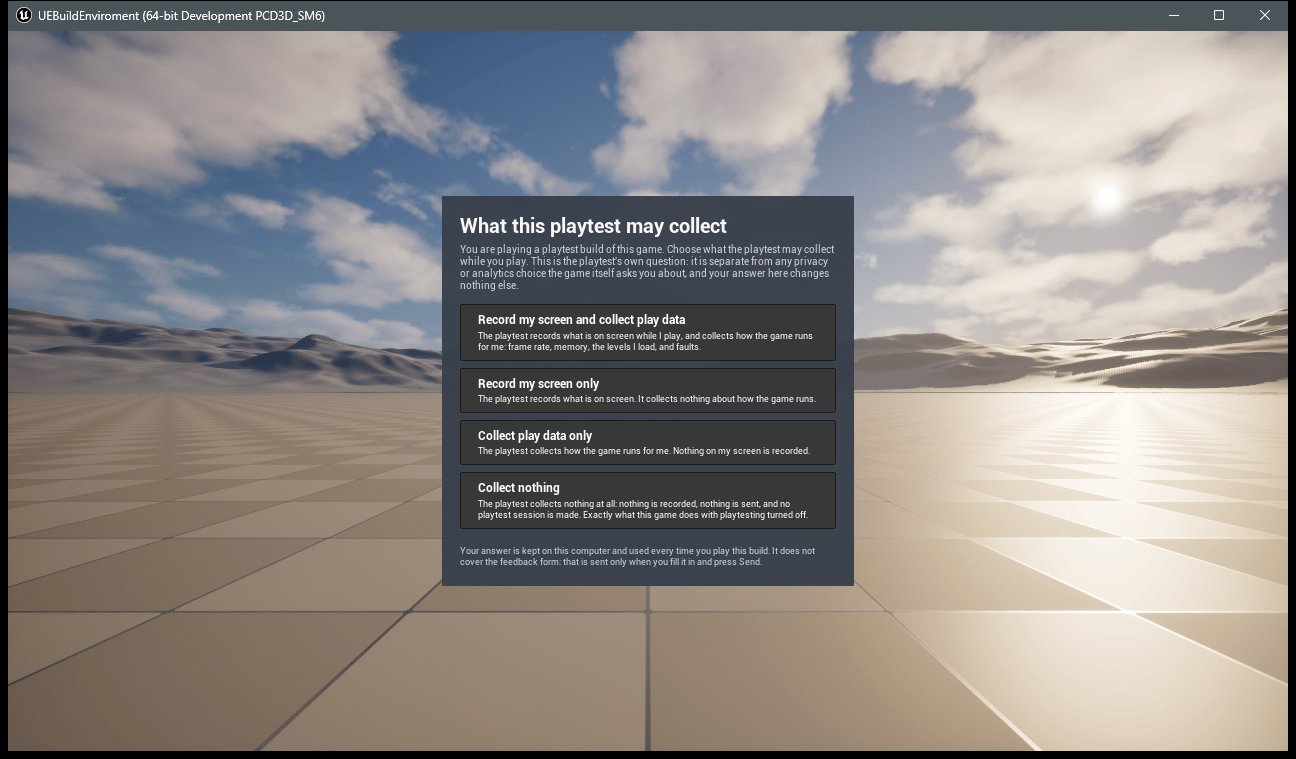
**A playtest build asks its player what it may collect, and collects nothing until they answer.** The
question is drawn over the game as soon as this build's playtest loads, and offers four answers: record
the screen and collect play data, the screen only, play data only, or **nothing at all** — which leaves
the build behaving exactly as one with **Enable Playtesting** off.
Set the version's **name**, not the ID Protokite displays. The Flock SDK resolves Game Version again
whenever Game Version, API URL or API Key changes, and replaces an ID written in by hand.
Pressing **Play** now lists in the Play message log whatever would stop the playtest or change it, each
with a link to the page that fixes it: an empty or unusable Protokite API URL, the Flock SDK's
analytics turned off, a Game Version that is not a playtest's, and the settings a playtest session
waits on. Nothing is said while **Enable Playtesting** is off.
## What the player is asked
**A playtest build asks its player what it may collect, and collects nothing until they answer.** The
question is drawn over the game as soon as this build's playtest loads, and offers four answers: record
the screen and collect play data, the screen only, play data only, or **nothing at all** — which leaves
the build behaving exactly as one with **Enable Playtesting** off.
 **It is the playtest's own question.** The Flock SDK's **Analytics Require Explicit Consent** is a
different one, asked by your game in your game's words about your game's analytics. Neither answer
moves the other, and the question says so in front of the player.
Their answer is kept on their machine and used by every later launch, and each session start carries
`playtest_consent` and `playtest_consent_asked`, so a session with no recording reads as a player who
asked for none rather than a build that went wrong.
Your game can take the question over: **Flock Get Playtest Consent** reads the answer, **Flock Set
Playtest Consent** records one from your own screens, and **Flock Ask For Playtest Consent** puts the
question again — what a "change what this playtest collects" entry in a menu calls.
Turn **Ask The Player For Playtest Consent** off in **Flock Playtest Settings** only where your players
are asked another way, for an internal test on your own machines, or for an automated run with nobody
there to answer; the build then collects what the playtest turns on, and every session says the player
was never asked. An answer a player has already given is still honoured.
## Sign a player in
**A playtest never signs a player in.** The playtest session starts from the Flock session, and a Flock
session starts once your game signs a player in, with **Analytics Enabled** and **Analytics Auto Start
Session** on (or a Start Session call) and consent granted when **Analytics Require Explicit Consent**
is on. A device sign-in is enough and needs no account.
A playtest build with no sign-in screen of its own can sign in from the console of a Development build
with `Flock.LoginWithDevice`.
## Watch it run
The log, under `LogFlockPlaytest`, says what the playtest is doing:
1. Playtesting is set up and waiting for the Flock SDK, then fetching this build's playtest from Protokite.
2. Playtesting is ready, naming the playtest and the features it turns on.
3. The Protokite session started for this launch, once a player is signed in and the Flock session has
reached the server.
The session then appears on the playtest's **Sessions** page. It ends when the game shuts down, or
earlier with **Flock End Playtest Session**. A later Flock session, a sign-out, or the Flock SDK
initializing again neither ends nor restarts it: a launch is one session.
In Blueprint, **Flock Get Playtest Status** answers the same question the log does, and **Flock
Describe Playtest Status** turns it into the sentence the log uses.
## When something stops the playtest
The log says why and names the setting, once, as a warning.
| Status | Meaning | Fix |
| ----------------------------- | ---------------------------------------------------------------------- | ---------------------------------------------------------------- |
| Protokite API URL missing | **Enable Playtesting** is on and the URL is empty | Set **Protokite API URL** |
| Protokite API URL unusable | No `http://` or `https://`, no host, or a space or line break in it | Correct the URL; it is never trimmed for you |
| Playtest not linked | Protokite has no playtest for this build's Game Version ID | Point **Game Version** at the playtest's `pt-` version |
| Protokite refused API key | Protokite turned down the Flock API key | Check **API Key** in the Flock SDK's settings |
| Playtest config unavailable | Protokite or the network kept failing | Nothing — it is fetched again when the next Flock session starts |
| Playtest no longer collecting | The playtest has closed | Reopen it in Protokite, or point Game Version at a running one |
| Waiting for player consent | The playtest is loaded and the player has not said what it may collect | Nothing — it is asked over the game |
| Player refused playtest | The player asked for nothing to be collected | Nothing — it is their answer |
## Shipping builds
A Shipping build that has **Enable Playtesting** on, or that carries a playtest's `pt-` Game Version,
gets a warning while it builds, and the build still succeeds. That warning comes from the plugin's
build rules, which a clean build reads and an unchanged rebuild skips — so package a release from a
clean build. Build playtests as Development, and point Game Version back at a release version before
you ship.
## Tell your players
A playtest build records the player's screen when the playtest turns video on, and sends what they type
into the feedback form. The build asks them first, and does what they answer, but tell your testers
before they play all the same: what is recorded, that it goes to your studio's Protokite playtest, and
how to reach you to have it removed. That question is about this playtest alone — anything your game
collects of its own is still yours to ask about.
Nothing is collected unless **Enable Playtesting** is on in the build *and* the playtest in Protokite
turns the feature on, and a build without the plugin collects none of it.
Video, performance windows, exceptions and feedback forms, and the Blueprint nodes for each.
The Flock SDK the playtest runs on: setup, auth, and your game's data.
**It is the playtest's own question.** The Flock SDK's **Analytics Require Explicit Consent** is a
different one, asked by your game in your game's words about your game's analytics. Neither answer
moves the other, and the question says so in front of the player.
Their answer is kept on their machine and used by every later launch, and each session start carries
`playtest_consent` and `playtest_consent_asked`, so a session with no recording reads as a player who
asked for none rather than a build that went wrong.
Your game can take the question over: **Flock Get Playtest Consent** reads the answer, **Flock Set
Playtest Consent** records one from your own screens, and **Flock Ask For Playtest Consent** puts the
question again — what a "change what this playtest collects" entry in a menu calls.
Turn **Ask The Player For Playtest Consent** off in **Flock Playtest Settings** only where your players
are asked another way, for an internal test on your own machines, or for an automated run with nobody
there to answer; the build then collects what the playtest turns on, and every session says the player
was never asked. An answer a player has already given is still honoured.
## Sign a player in
**A playtest never signs a player in.** The playtest session starts from the Flock session, and a Flock
session starts once your game signs a player in, with **Analytics Enabled** and **Analytics Auto Start
Session** on (or a Start Session call) and consent granted when **Analytics Require Explicit Consent**
is on. A device sign-in is enough and needs no account.
A playtest build with no sign-in screen of its own can sign in from the console of a Development build
with `Flock.LoginWithDevice`.
## Watch it run
The log, under `LogFlockPlaytest`, says what the playtest is doing:
1. Playtesting is set up and waiting for the Flock SDK, then fetching this build's playtest from Protokite.
2. Playtesting is ready, naming the playtest and the features it turns on.
3. The Protokite session started for this launch, once a player is signed in and the Flock session has
reached the server.
The session then appears on the playtest's **Sessions** page. It ends when the game shuts down, or
earlier with **Flock End Playtest Session**. A later Flock session, a sign-out, or the Flock SDK
initializing again neither ends nor restarts it: a launch is one session.
In Blueprint, **Flock Get Playtest Status** answers the same question the log does, and **Flock
Describe Playtest Status** turns it into the sentence the log uses.
## When something stops the playtest
The log says why and names the setting, once, as a warning.
| Status | Meaning | Fix |
| ----------------------------- | ---------------------------------------------------------------------- | ---------------------------------------------------------------- |
| Protokite API URL missing | **Enable Playtesting** is on and the URL is empty | Set **Protokite API URL** |
| Protokite API URL unusable | No `http://` or `https://`, no host, or a space or line break in it | Correct the URL; it is never trimmed for you |
| Playtest not linked | Protokite has no playtest for this build's Game Version ID | Point **Game Version** at the playtest's `pt-` version |
| Protokite refused API key | Protokite turned down the Flock API key | Check **API Key** in the Flock SDK's settings |
| Playtest config unavailable | Protokite or the network kept failing | Nothing — it is fetched again when the next Flock session starts |
| Playtest no longer collecting | The playtest has closed | Reopen it in Protokite, or point Game Version at a running one |
| Waiting for player consent | The playtest is loaded and the player has not said what it may collect | Nothing — it is asked over the game |
| Player refused playtest | The player asked for nothing to be collected | Nothing — it is their answer |
## Shipping builds
A Shipping build that has **Enable Playtesting** on, or that carries a playtest's `pt-` Game Version,
gets a warning while it builds, and the build still succeeds. That warning comes from the plugin's
build rules, which a clean build reads and an unchanged rebuild skips — so package a release from a
clean build. Build playtests as Development, and point Game Version back at a release version before
you ship.
## Tell your players
A playtest build records the player's screen when the playtest turns video on, and sends what they type
into the feedback form. The build asks them first, and does what they answer, but tell your testers
before they play all the same: what is recorded, that it goes to your studio's Protokite playtest, and
how to reach you to have it removed. That question is about this playtest alone — anything your game
collects of its own is still yours to ask about.
Nothing is collected unless **Enable Playtesting** is on in the build *and* the playtest in Protokite
turns the feature on, and a build without the plugin collects none of it.
Video, performance windows, exceptions and feedback forms, and the Blueprint nodes for each.
The Flock SDK the playtest runs on: setup, auth, and your game's data.