Store custom per-player documents — progression, settings, and state.
Player data lets you persist arbitrary JSON for a player: level, coins, unlocked content,
preferences — whatever your game needs. Documents are scoped to the signed-in player.A typical setup has two sides: define the shape in the dashboard, then read and write it from
the SDK.
Dashboard
Unity
Unreal
A player data template defines the structure and defaults for a kind of document, keeping
records consistent across players and versions. Define templates in the dashboard; players
inherit them automatically.
Define player data templates in the dashboard.
Run Code Generation → Sync Schemas in the Flock window to turn each template into a typed C#
class, then read and write the signed-in player’s document directly:
// Read (paginates and caches the player's documents on first call)var progress = await FlockClient.Instance.Player.GetPlayerProgressAsync();// Mutate the typed object and save it backprogress.Level = 2;progress.Coins += 100;await progress.UpdateAsync();
The method and field names come from your template (PlayerProgress → GetPlayerProgressAsync).
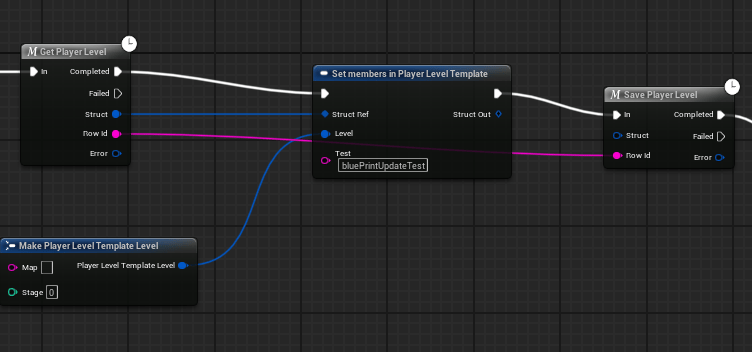
Read a player’s rows with the Flock | Player nodes, or the player provider in C++. You never pass
a player ID — calls act for the signed-in player.
After a schema sync this collapses to one node returning a typed struct with real pins, and
writing back is a second node — see Work with your game data.
Get, change, and save a player's row — no strings, no IDs typed by hand.
Writes queue offline and replay automatically when the connection returns.
Keep documents small and purpose-scoped (e.g. a progression doc and a settings doc) rather
than one giant blob — it makes partial updates and debugging far easier.

 Qwacks
 Flock
Flock Protokite
 Data Duck