Change game behavior and run experiments without shipping a build.
Remote config lets you control values and feature flags from the server, so you can tune your
game, gate features, and run experiments without a client update.
Dashboard
Unity
Unreal
Manage config values and feature flags for a game version in the dashboard, and vary them by
segment.
Manage remote config values and feature flags in the dashboard.
Run Code Generation → Sync Schemas to turn each config into a typed C# class. The SDK
resolves the right values for the signed-in player — including any segment-based overrides:
var gameplay = await FlockClient.Instance.Config.GetGameplayAsync();float speed = gameplay.BaseMoveSpeed;
The accessor name comes from your config (Gameplay → GetGameplayAsync). Fetch at startup and
read values instead of hardcoding them.Values resolve patch-first: where a patch applies to the running game
version you get the patched value, otherwise the config’s own — your code never learns which.Config reads are cached and served from disk when the server is unreachable, so a returning player
still gets your tuning values offline. The cache needs one successful online read to fill.
Code generation is the intended path here, not a convenience. The raw config getters on the
provider are internal — the generated typed accessors are the public API.
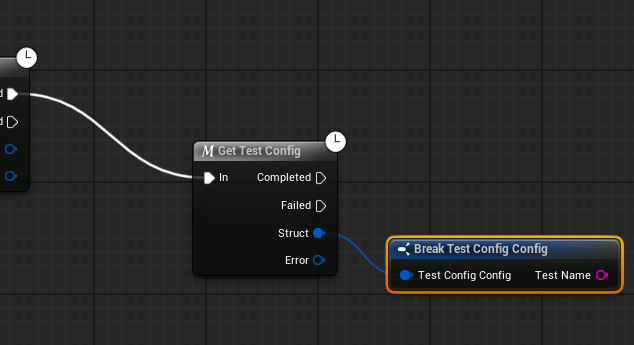
Flock Resolve Config Data returns the effective values for the running game version — the patch
where one applies, the config’s own data otherwise. Your graph never learns which happened.

 Qwacks
 Flock
Flock Protokite
 Data Duck